I Switched to the Aerox 5 and Here is What Happened
The landscape of performance peripherals has shifted dramatically over the last few years, moving away from the heavy, feature-laden "tanks" of the past toward ultra-lightweight designs that prioritize speed and agility. In this transition, enthusiasts often found themselves at a crossroads: do they choose a mouse that is incredibly light but lacks buttons, or do they stick with a multi-button layout that feels like pushing a brick across the desk? The Aerox 5 was designed to bridge this exact gap, promising a multi-genre versatility that caters to both high-speed shooters and complex strategy games. This analysis explores the transition to this specific hardware and how it impacts the daily workflow and gaming experience of a modern user.
Switching to a new primary input device is rarely a seamless process. Muscle memory is a stubborn thing, and the tactile feedback of a mouse—the tension in the clicks, the glide of the feet, and the arch of the shell—dictates how a user interacts with their digital environment. The Aerox 5 enters the market as a "midweight" ultra-light, weighing in at roughly 66 grams for the wired version and 74 grams for the wireless variant. For those coming from traditional productivity mice or older gaming models that often exceeded 100 grams, the difference is immediate and transformative. It is not just about the weight; it is about the physics of inertia. Stopping a flick shot in a competitive first-person shooter becomes significantly easier when there is less mass fighting against the user’s wrist.
Engineering the Lightweight Multi-Genre Mouse
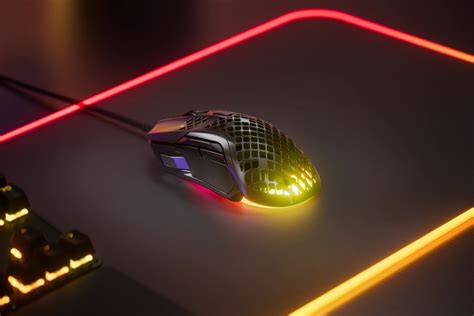
The most striking feature of the Aerox 5 is its "Holey" shell. This honeycomb pattern is not merely an aesthetic choice; it is a structural necessity to shed weight without compromising the integrity of the chassis. Many potential buyers worry about the durability of such a design, fearing that dust, hair, or even an accidental spill might end the device's life. To combat this, the engineering behind the Aerox 5 includes what is known as AquaBarrier technology. This is an IP54-rated protection layer that shields the internal circuitry from environmental hazards. While it doesn't make the mouse waterproof in a submersible sense, it provides peace of mind for the average gamer who might have a drink on their desk or lives in a dusty environment.
The ergonomics of the Aerox 5 are tailored toward a right-handed grip, featuring a slight ergonomic tilt that supports the hand during long sessions. Unlike many ultra-light mice that opt for a symmetrical, "ambidextrous" shape to save weight, the Aerox 5 retains a contoured profile. This makes it particularly appealing to users who use a palm or claw grip. Transitioning from a flatter mouse to this contoured shape usually results in reduced strain on the carpal tunnel area, as the hand sits at a more natural angle. The side button layout is where this mouse truly distinguishes itself from the competition. It features a total of nine programmable buttons, including a flick switch (a custom up/down toggle) that is often missing from ultra-light competitors.
Performance in High-Stakes Environments
When analyzing performance, the internal sensor is the heart of the experience. The Aerox 5 utilizes the TrueMove Air sensor, a collaboration with PixArt that focuses on 1-to-1 tracking accuracy. In a real-world gaming scenario, this translates to predictable movement. If a user moves the mouse exactly two inches across a cloth pad, the cursor moves precisely the calibrated distance on the screen without jitter, acceleration, or smoothing. For professionals who rely on muscle memory, this consistency is non-negotiable. During the switch to this device, the most noticeable improvement often comes in the form of "lifting." Because the mouse is so light, repositioning it during intense gameplay feels effortless, reducing the physical fatigue that can set in after several hours of play.
The click feel is another critical area of analysis. The Aerox 5 uses Golden Micro IP54 switches, which are rated for 80 million clicks. Unlike the mushy clicks found on some entry-level mice, these switches provide a crisp, tactile "snap." This feedback is vital in gaming but equally important for productivity tasks like video editing or graphic design, where "click and drag" precision is essential. The integration of the PTFE (Polytetrafluoroethylene) glide skates on the bottom of the mouse ensures that the low weight is complemented by low friction. On a high-quality mousepad, the Aerox 5 feels as though it is floating, allowing for micro-adjustments that are difficult to achieve with heavier, rubber-footed alternatives.
Comparative Analysis: Where the Aerox 5 Stands
To understand the impact of switching to the Aerox 5, it is helpful to compare it against the other prevailing categories of gaming mice currently on the market. Most users are coming from one of two extremes: the "FPS Specialist" (minimal buttons, extremely light) or the "MMO Giant" (many buttons, very heavy). The following table illustrates how the Aerox 5 attempts to find the "Goldilocks" zone between these two philosophies.
| Feature | Standard FPS Mouse | Aerox 5 (Multi-Genre) | Classic MMO Mouse |
|---|---|---|---|
| Weight Range | 50g - 63g | 66g - 74g | 110g - 140g |
| Programable Buttons | 5 to 6 | 9 | 12 to 20 |
| Primary Use Case | Twitch shooters (CS, Valorant) | Battle Royales, ARPGs, Hybrid work | WoW, FFXIV, Macro-heavy tasks |
| Sensor Emphasis | Speed and Liftoff | Versatility and Accuarcy | High DPI and Utility |
| Durability Rating | Standard | IP54 Dust/Water Resistant | Standard |
As the table shows, the Aerox 5 occupies a unique niche. It is light enough to compete in the FPS space but offers enough utility to satisfy those who need extra macros for games like Apex Legends, Fortnite, or even productivity software like Adobe Premiere Pro. For many users, this single device replaces the need for a "work mouse" and a "gaming mouse," streamlining the desktop setup significantly.
Shop the latest Electronics picks on Amazon.
See Deals →Pros and Cons: The Reality of the Transition
No piece of hardware is perfect for every user. The transition to the Aerox 5 reveals several distinct advantages and a few specific drawbacks that potential buyers should consider before making the jump. Performance is subjective, but the following points summarize the general consensus of those who have integrated this mouse into their long-term setup.
- Unmatched Versatility: The nine-button layout is exceptionally well-placed, allowing for complex inputs in Battle Royales without the bulk of a dedicated MMO mouse.
- Weight-to-Utility Ratio: Achieving a weight under 75 grams while maintaining nearly double the buttons of a standard mouse is a significant engineering feat that drastically reduces wrist fatigue.
- Superior Protection: The AquaBarrier technology is a massive benefit for honeycomb-style mice, mitigating the risks of internal damage from environmental factors.
- Highly Flexible Cable: For those choosing the wired version, the "Super Mesh" cable minimizes drag, making the mouse feel almost wireless on a good setup.
- Customization: The PrismSync RGB lighting is bright and accurately diffused through the honeycomb shell, though this is primarily an aesthetic benefit.
However, there are trade-offs to be aware of:
- Button Learning Curve: The "up/down" flick switch on the side requires a different thumb movement than traditional side buttons, which can take several days to master.
- Honeycomb Texture: Some users find the feeling of the holes against their palm to be distracting or uncomfortable, depending on their grip pressure.
- Size Constraints: The Aerox 5 is a relatively long mouse. Users with small hands may find it difficult to reach the forward-most side buttons comfortably.
- Cleaning Requirements: While the internals are protected, the honeycomb shell will inevitably collect debris over months of use, requiring periodic compressed air cleaning.
The Practical Buying Guide: Is the Aerox 5 Right for You?
Before deciding to switch, it is important to evaluate your specific needs. The electronics market is flooded with options, and "ultra-light" is no longer a niche category. When considering the Aerox 5, ask yourself the following questions regarding your habits and preferences.
1. What is your primary gaming genre?
If you play exclusively tactical shooters where you only need two side buttons, you might prefer an even lighter, 50-gram mouse. However, if your library is diverse—ranging from Call of Duty to Diablo IV or League of Legends—the Aerox 5 is likely a better fit. The extra buttons allow you to map health potions, abilities, or mounting commands directly to your thumb, which can be life-saving in high-pressure moments.
2. How do you hold your mouse?
The Aerox 5 is optimized for palm and claw grips. If you are a Fingertip grip user, you may find the length of the mouse cumbersome. Measure your hand from the base of the palm to the tip of the middle finger. If you are over 18cm, the Aerox 5 will likely feel like an extension of your arm. For those under 16cm, it might feel slightly oversized, particularly when trying to reach the "sniper" button or the top toggle.
3. Wired vs. Wireless?
The wired model is lighter and more affordable, making it the choice for pure performance purists. The wireless model adds a few grams but offers the freedom of 2.4GHz "Quantum 2.0" connectivity and Bluetooth. The wireless version also boasts incredible battery life (up to 180 hours in Bluetooth mode), which is essential for those who want a clean, cable-free desk. If you travel with a laptop, the wireless version’s ability to toggle between a gaming dongle and standard Bluetooth is a major convenience factor.
4. Does your environment demand durability?
In the electronics world, the "open-shell" design was often seen as fragile. If you are someone who eats or drinks at their desk, or if you live in a particularly humid climate, the IP54 rating of the Aerox 5 makes it a much safer bet than other honeycomb mice that leave their PCB (Printed Circuit Board) completely exposed. This "ruggedized" approach to ultra-light design is one of the strongest selling points for the Aerox line.
Discover deals on Electronics — updated daily.
Browse Now →Impact on Productivity and Professional Workflow
Often overlooked in reviews of gaming peripherals is how they handle the "other" 40 hours of the week. Most buyers are not just gamers; they are students, creators, and professionals. Switching to the Aerox 5 has a surprisingly high impact on productivity. The nine buttons are not just for spells and grenades; they can be mapped to common OS functions. For example, the flick switch can be mapped to "Copy" and "Paste," while the side buttons can handle "Undo" or "Redo."
In software like Excel or CAD programs, having macros at your fingertips reduces the number of times you need to move your left hand back and forth across the keyboard. Furthermore, the light weight is a boon for office work. When you are moving a cursor across multiple 4K monitors all day, a heavy mouse contributes to "mouse shoulder" and wrist strain. The Aerox 5 moves with a flick of the fingers, requiring less activation energy from the larger muscle groups in the arm. This ergonomic benefit is often the primary reason users stick with the mouse even if they stop gaming as frequently.
Environmental and Aesthetic Integration
Beyond the tech specs, the Aerox 5 changes the visual profile of a workspace. The RGB implementation is divided into three zones, and because of the holey structure, the light glows from within the mouse rather than just around the edges. This creates a "lightning-in-a-bottle" effect that can be synchronized with other peripherals. For those who prefer a professional look, the lighting can be turned off entirely, leaving a sleek, matte black (or white) industrial-looking tool that doesn't scream "gamer" in a traditional office setting.
The switch to a USB-C charging port (on the wireless model) or a detachable USB-C cable (on the wired model) is a welcome standard in the electronics industry. It means one less proprietary cable to worry about. If the cable ever breaks, it is easily replaceable—a feature that isn't always guaranteed even in high-end electronics. This modular approach to the cable and the long-lived switches suggests that the Aerox 5 is built for a multi-year lifecycle, rather than being a disposable seasonal upgrade.
Conclusion
Transitioning to the Aerox 5 represents a shift in how a user values their interaction with their PC. It is a departure from the "more is more" philosophy of heavy, button-stuffed mice, and a move toward a more refined, athletic approach to hardware. By stripping away unnecessary mass while retaining a high level of utility, the Aerox 5 addresses the specific needs of the modern "hybrid" user—the person who needs to be as effective in a spreadsheet as they are in a high-speed digital skirmish.
The experience of using the Aerox 5 is defined by its lack of resistance. Whether it is the lack of physical weight, the lack of cable drag, or the lack of friction on the pad, the mouse essentially gets out of its own way. While the honeycomb design and the specific button layout might require a short period of adjustment, the long-term benefits for wrist health and performance are palpable. In the crowded arena of electronics and gaming peripherals, the Aerox 5 succeeds by proving that you don't have to sacrifice functionality to achieve a lightweight design. It is a versatile, durable, and highly precise tool that earns its place on any high-performance desk.